ESP32 Family Comparison 2026: Which ESP32 Should You Choose?
Choose by radio, workload and product constraints: a practical guide to ESP32-S3, C3, C5, C6, C61, H2, P4 and S31, with H4 and original ESP32 context.
In This Article
Start with the radio your product needs and the workload it must sustain. The ESP32 name now spans inexpensive Wi-Fi nodes, Thread devices without Wi-Fi, wireless processors with richer application resources, and display-oriented MCUs with no integrated radio. Choosing from the name alone can lock the product into the wrong architecture.
This guide assumes you are choosing within Espressif’s ecosystem. If that decision is still open, first compare ESP32 with STM32; the family shortlist below answers the next question.
Which ESP32 should I choose?
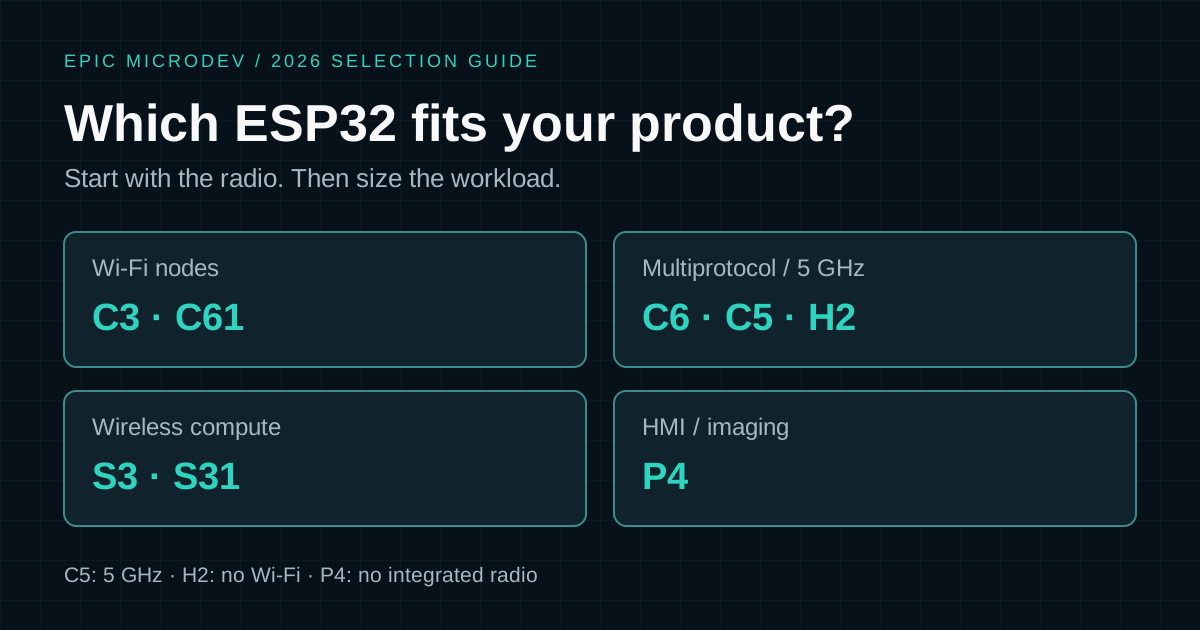
Quick selection: C3 for a simple Wi-Fi/BLE node; S3 for richer wireless application logic and USB; C6 for 2.4 GHz Wi-Fi 6 plus Thread/Zigbee; C5 when 5 GHz matters; H2 for BLE/802.15.4 without Wi-Fi; P4 for demanding HMI and imaging with connectivity designed separately. Also evaluate C61 for Wi-Fi 6 with PSRAM options, and S31 for newer wireless compute/HMI designs.
These are evaluation starting points, not rankings. A newer part is useful only if its interfaces, software support, supply and validation effort improve the actual product. Before selecting a module, write down the required network, USB role, display/camera interface, memory budget and support lifetime.
Official sources were reviewed on 19 October 2026. C61 has production-silicon SDK support, and Espressif announced S31 mass production on 27 July 2026. H4 is discussed separately because the availability evidence reviewed is a sample announcement; confirm production supply before using it as a committed design baseline.
ESP32 family comparison table
Read across one family at a time. CPU counts below mean application cores; low-power coprocessors are separate. Clocks are documented maxima, not comparative benchmarks. BLE means Bluetooth Low Energy; it does not imply Classic Bluetooth audio support.
On smaller screens, scroll horizontally to read all columns.
| Family | Application CPU | Integrated radios | USB | Memory / compute distinction | Evaluate for |
|---|---|---|---|---|---|
| ESP32-S3 | 2 × Xtensa LX7, up to 240 MHz | 2.4 GHz Wi-Fi 4; BLE; no 802.15.4 | Full-speed OTG; Serial/JTAG | External PSRAM options; vector instructions | Wireless application logic, USB, modest displays and cameras |
| ESP32-C3 | 1 × RISC-V, up to 160 MHz | 2.4 GHz Wi-Fi 4; BLE; no 802.15.4 | Serial/JTAG | Internal SRAM; no general external PSRAM support | Simple connected sensors and controls |
| ESP32-C5 | 1 × RISC-V, up to 240 MHz | 2.4 / 5 GHz Wi-Fi 6; BLE; 802.15.4 | Serial/JTAG | Flash/PSRAM controller; exact memory depends on variant | Dual-band connected products, including Thread/Zigbee candidates |
| ESP32-C6 | 1 × RISC-V, up to 160 MHz | 2.4 GHz Wi-Fi 6; BLE; 802.15.4 | Serial/JTAG | Internal SRAM and external flash; no general PSRAM interface | Wi-Fi or Thread/Zigbee endpoints |
| ESP32-C61 | 1 × RISC-V, up to 160 MHz | 2.4 GHz Wi-Fi 6; BLE; no 802.15.4 | Serial/JTAG | Quad-SPI PSRAM options | Wi-Fi/BLE products needing more memory flexibility |
| ESP32-H2 | 1 × RISC-V, up to 96 MHz | BLE; 802.15.4; no Wi-Fi | Serial/JTAG | Endpoint-oriented internal memory and packaged-flash options | Thread/Zigbee or BLE nodes |
| ESP32-P4 | 2 × RISC-V, up to 400 MHz* | No integrated Wi-Fi, BLE or 802.15.4 | High-speed and full-speed OTG; Serial/JTAG | PSRAM, imaging and graphics hardware | Higher-throughput HMI, cameras and local processing |
| ESP32-S31 | 2 × RISC-V, up to 320 MHz | 2.4 GHz Wi-Fi 6; BLE and Classic; 802.15.4 | High-speed USB OTG | SIMD, PSRAM expansion and graphics support | Newer wireless HMI, audio and multiprotocol designs |
*P4’s current v0.7 datasheet specifies up to 400 MHz; older documentation and silicon guidance may differ. Verify the ordered revision and supported operating point. All rows describe family capabilities, not every board or module: memory population, accessible pins and temperature grades remain ordering-code decisions.
USB Serial/JTAG is a fixed programming/debugging interface. It is not a substitute for a programmable USB device or host controller. Likewise, a flash interface does not automatically support usable external RAM. These two distinctions often eliminate a candidate before CPU speed matters.
- ESP32-S3 datasheet
- ESP32-C3 datasheet
- ESP32-C5 datasheet: radio, memory and revision-specific features
- ESP32-C6 datasheet
- ESP32-C61 datasheet
- ESP32-H2 datasheet
- ESP32-P4 datasheet: CPU, imaging, USB and memory
- Espressif: ESP32-S31
- ESP-USB: S31 USB device stack
- ESP-IDF: fixed-function C3 USB Serial/JTAG controller
What the family names do—and do not—tell you
Treat the letters as a navigation aid, not a hardware contract. The S devices discussed here emphasise application capability; C devices span cost-focused and newer Wi-Fi designs; H devices target BLE/802.15.4 use; P4 prioritises processing and interfaces without an integrated radio. The exact part remains the authority.
There are important exceptions to any shorthand. S3 uses Xtensa cores while S31 uses RISC-V. C61 is not simply a C6 with more of every feature: it offers PSRAM options but lacks C6’s 802.15.4 radio. C5 supports both 5 GHz Wi-Fi and 802.15.4, so those requirements are not mutually exclusive.
Keep silicon, module and development-board names separate in purchasing and firmware records. A board may add a USB bridge, radio companion or memory that the bare chip lacks. Record which functions belong to the chip and which belong to the surrounding design.
ESP32-S3: application compute, USB and wireless
S3 combines two Xtensa LX7 cores up to 240 MHz with 2.4 GHz Wi-Fi and BLE. It supports external flash/PSRAM configurations and useful display, camera and audio interfaces. Its full-speed USB OTG makes it a candidate when the product needs a real USB function as well as wireless connectivity.
The vector instructions accelerate suitable arithmetic through libraries such as ESP-DSP and ESP-NN. They do not make every model fast or remove memory constraints. Measure the actual preprocessing, inference and output pipeline with the chosen quantisation and model size; a tiny demonstration model is not a product benchmark.
Evaluate S3 for a connected instrument with a modest display, a USB accessory, audio processing or a camera node whose bandwidth fits. Budget PSRAM capacity and throughput for buffers rather than assuming two cores solve contention. Choose another family if integrated 802.15.4 or 5 GHz is mandatory.
ESP32-C3: a focused Wi-Fi and BLE node
C3’s single RISC-V application core runs up to 160 MHz. Its Wi-Fi 4 and BLE combination remains useful for a sensor, actuator or provisioned connected controller. A newer radio generation does not automatically improve a small periodic telemetry workload enough to justify migration.
Consider C3 when the application, networking and update buffers fit internal memory and the selected module provides enough pins. Its simpler resource envelope encourages explicit budgets for task stacks, TLS, message queues and peak traffic. Check complete board cost and availability rather than declaring it the cheapest part in every market.
Secure boot, flash encryption and cryptographic hardware are relevant capabilities, but provisioning and recovery still need a product policy. Its USB Serial/JTAG helps development; it does not turn C3 into a general USB peripheral. For battery operation, measure the full wake-connect-send-sleep cycle rather than comparing maximum clock rates.
ESP32-C6: Wi-Fi 6 with 802.15.4
C6 provides a 160 MHz RISC-V application core plus a separate low-power core. Its combination of 2.4 GHz Wi-Fi 6, BLE and IEEE 802.15.4 is the main reason to evaluate it. Standard MCU interfaces support connected controls and endpoints; it is not automatically an application-compute upgrade from S3.
802.15.4 enables Thread or Zigbee with the appropriate software stack. Matter can use Wi-Fi or Thread, but still requires device-model implementation, commissioning, credentials and a supported release configuration. Radio inclusion is only one item on that checklist.
For a product expected to run multiple protocols, verify the supported coexistence combinations. C6 shares its 2.4 GHz RF resource. Heavy Wi-Fi activity can compete with Thread/Zigbee traffic, especially router roles. Test the actual duty cycle; do not equate three supported protocols with three independent radios.
ESP32-C5: 5 GHz is the distinguishing requirement
C5 brings dual-band 2.4/5 GHz Wi-Fi 6, BLE and 802.15.4, with a RISC-V application core up to 240 MHz. It belongs on the shortlist when the deployment network or RF environment makes 5 GHz useful. It also remains a Thread/Zigbee candidate: C5-versus-C6 is not a choice between 5 GHz and 802.15.4.
A less congested band may improve an installation, but verify antenna performance, enclosure losses and coverage at the actual mounting position. 5 GHz can have a less favourable propagation margin through obstacles; it is not universally faster or more reliable at the application level. Dual-band capability is not a promise of simultaneous operation on two Wi-Fi channels.
Check the regional channel configuration, access-point compatibility and reconnect behaviour. Current C5 documentation includes PSRAM-capable variants and revision-dependent peripherals. Match the exact ordering code and silicon revision to your requirements instead of copying a schematic or peripheral list from an early announcement.
ESP32-C61: Wi-Fi 6 with a different memory trade-off
C61 deserves inclusion in a 2026 selection exercise. It combines a single 160 MHz RISC-V application core, 2.4 GHz Wi-Fi 6 and BLE with Quad-SPI PSRAM options. It does not include 802.15.4, so it cannot replace C6 as a standalone Thread/Zigbee radio.
Evaluate it when wireless application buffers exceed a basic internal-memory design but the workload does not require S3’s dual application cores or USB OTG. Confirm memory population, peripheral routing and SDK support for the purchased revision. Espressif’s developer portal identifies initial production-silicon support in ESP-IDF v5.5.2; do not assume an older project branch supports the new target.
ESP32-H2, H21 and H4: choose the network architecture first
H2 combines a RISC-V core up to 96 MHz, BLE and 802.15.4 without Wi-Fi. That is a useful architectural choice for a Thread/Zigbee endpoint or BLE product, not a missing feature to work around. A Wi-Fi-only phone or router cannot directly supply a Thread network connection.
For Matter over Thread, plan how commissioning reaches the device and where the Thread Border Router lives. The endpoint need not contain the border router. A gateway is a different role, requiring a connection between the Thread network and the wider IP network; adding another chip may be appropriate there.
H21: an incremental low-power evolution of H2
H21 targets BLE and IEEE 802.15.4 applications, including Thread, Zigbee and BLE endpoints. Its integrated DC-DC converter is intended to improve active-power efficiency, making it worth evaluating for newer battery-powered designs. Measure the complete operating cycle rather than assuming a guaranteed battery-life improvement.
Espressif’s H21 status page still describes preview ESP-IDF support at this review. Keep H2 as the baseline and assess H21 separately: verify current SDK and protocol-stack support, silicon status, module availability and production supply before committing a product schedule. H21 remains outside the main shortlist until those checks are satisfied.
H4 is a separate evaluation, not a renamed H2
H4 targets more capable low-power BLE/802.15.4 products, with dual-core processing and newer Bluetooth features including LE Audio. Espressif’s March 2026 announcement offers samples on request. The evidence reviewed does not establish general production availability, so H4 is excluded from the main recommendation table. Confirm supply, supported SDK features and qualification dates directly before committing a schedule.
ESP32-P4: HMI and imaging with connectivity designed separately
P4 is a different architecture decision: dual RISC-V application cores, high-speed memory interfaces and dedicated display/imaging resources, without integrated Wi-Fi or Bluetooth. The current datasheet lists MIPI CSI/DSI, an image signal processor, JPEG hardware, an H.264 encoder, graphics processing and high-speed USB OTG.
Evaluate it when the display, camera or data path is the hard requirement. Select the panel or sensor interface, pixel format, buffer arrangement and memory configuration together. An impressive CPU specification cannot rescue an unsupported sensor interface or a frame-buffer bandwidth deficit.
A wireless product needs a companion connectivity solution, with an interprocessor interface, update strategy and failure behaviour. Include that second firmware image in support planning. P4 is not simply a faster C6: its value is processing and peripheral architecture, while connectivity adds system complexity and board cost.
ESP32-S31: a newer wireless compute candidate
S31 must be considered separately from S3. Espressif’s July 2026 production announcement specifies dual RISC-V cores up to 320 MHz, SIMD capability, PSRAM expansion, 2.4 GHz Wi-Fi 6, BLE/Classic Bluetooth and 802.15.4. It also describes an Ethernet MAC and HMI resources; current USB documentation covers its high-speed device support.
This makes S31 worth evaluating where richer application processing and modern connectivity are needed together. The reviewed S31 v0.5 datasheet is still marked preliminary; mass production does not establish maturity of every SDK feature, driver or module. Check board/module availability and support for the particular protocol combination. Porting from S3 changes CPU architecture, so validate libraries and any architecture-specific code rather than assuming binary or pin compatibility.
Should I still use the original ESP32?
The original ESP32 remains relevant to maintained products and established codebases. Its Wi-Fi, BLE and Classic Bluetooth capabilities can matter when existing libraries or audio profiles depend on them. Check the exact variant: the original family contains different core and memory configurations, and its capabilities should not be generalised to every ESP32-branded chip.
For a new board, compare migration cost against the benefits of another family. Keep a working original-ESP32 design when its requirements, supply and maintenance plan justify it; do not label the whole family obsolete. Conversely, legacy familiarity alone is a weak reason to accept a missing USB interface or unsuitable radio architecture.
Why not put every Espressif device in the main table?
C2 remains relevant to tightly cost-constrained Wi-Fi/BLE designs, and S2 can suit Wi-Fi/USB products without Bluetooth. They are omitted from the main shortlist to keep this guide focused on the broader decision branches, not because they are declared obsolete. Use the selector for narrower cost, package or interface requirements; specialist companions are not interchangeable application MCUs.
Common ESP32 head-to-head decisions
ESP32-S3 vs ESP32-C6
Evaluate S3 for application concurrency, vector-supported work, PSRAM and programmable USB. Evaluate C6 when Wi-Fi 6 or integrated Thread/Zigbee drives the design. First determine whether the limiting resource is the radio, memory or application pipeline; the larger clock number is not the answer.
ESP32-C3 vs ESP32-C6
C3 remains a sensible baseline for simple Wi-Fi/BLE firmware. C6 adds Wi-Fi 6 and 802.15.4. Choose those additions because the product uses them, and budget the corresponding protocol stacks and coexistence testing. Existing C3 code can still require peripheral and configuration work when moved.
ESP32-C5 vs ESP32-C6
Both support BLE and 802.15.4. C5 adds 5 GHz Wi-Fi and a different compute/memory/peripheral balance; C6 focuses on 2.4 GHz connectivity. Compare deployment networks, available modules and the exact SDK combination. Do not select C6 solely on the mistaken assumption that C5 lacks Thread-capable radio hardware.
ESP32-H2 vs ESP32-C6
H2 fits a design that intentionally uses Thread/Zigbee or BLE without Wi-Fi. C6 fits when integrated Wi-Fi is genuinely required as well. A battery endpoint and a continuously listening gateway are different workloads; matching the network role matters more than counting protocols.
ESP32-S3 vs ESP32-P4
S3 offers integrated wireless and a comparatively compact application platform. P4 addresses more demanding display, imaging and interface requirements but needs separate wireless connectivity. Prototype with the real display or sensor before choosing; also include S31 when a newer integrated-wireless HMI platform fits the schedule.
Which ESP32 should you choose for Matter, Thread or Zigbee?
Matter is an application-layer interoperability system, not a radio. Matter over Wi-Fi uses a Wi-Fi network; Matter over Thread uses Thread’s IP mesh over 802.15.4. BLE commonly assists commissioning, but is not the normal Matter operational network transport. Verify the target, device type and commissioning path against the ESP-Matter release you plan to ship.
H2, C6 and C5 have 802.15.4 hardware; S31 adds another current candidate, while H4 requires the availability checks above. C3, S3 and C61 do not have that radio. Wi-Fi-capable parts can be candidates for Matter over Wi-Fi without needing 802.15.4; memory and SDK requirements still apply.
Zigbee and Thread share a radio standard but use different network stacks. A Zigbee accessory is not automatically a Matter-over-Thread accessory. Bridging it into a Matter installation requires a bridge implementation, including the relevant device model, rather than merely changing the chip’s marketing label.
A Thread Border Router connects the Thread mesh to another IP network. Espressif’s C6 coexistence guidance recommends a dual-SoC solution with separate antennas for Wi-Fi Thread Border Router or Zigbee gateway products. Distinguish an endpoint demonstration from a reliable gateway under simultaneous traffic.
Which ESP32 should you choose for Wi-Fi?
S3 and C3 provide 2.4 GHz Wi-Fi 4. C6, C61 and S31 provide 2.4 GHz Wi-Fi 6; C5 adds the 5 GHz option. Wi-Fi generation and frequency band are separate choices: a Wi-Fi 6 device need not support 5 GHz, and Wi-Fi 6 does not promise desktop-class throughput.
The current C5, C6 and C61 documentation describes 20 MHz operation in 802.11ax mode. Features such as OFDMA and Target Wake Time depend on the network and configuration. Check the deployed routers, connection security, power-saving mode and traffic pattern before assigning a throughput or battery-life benefit.
Test congested networks, weak coverage, reconnects and provisioning with the final antenna and enclosure. A device that sends a short report once an hour has different priorities from a camera streaming continuously. The useful metric is successful application work within the energy and latency budget, not the radio’s headline PHY rate.
Compute, USB and memory: do not rank by MHz
Separate serial work, parallel work and peripheral transfers. Two cores help only when tasks can progress independently without bottlenecking on locks, memory or the radio. Vector instructions help supported kernels; hardware display and imaging blocks help their intended formats and pipelines. None is a universal application-speed multiplier.
For a display, estimate frame-buffer storage, refresh traffic and rendering time. For a camera, include capture buffers, compression, inference and network queues. For a connected controller, reserve resources for protocol bursts, logging and OTA alongside control tasks. Use peak simultaneous demand rather than the idle heap reading.
External PSRAM increases capacity but does not behave identically to internal SRAM. Check cache behaviour, DMA restrictions, access latency and support in the chosen driver. Select the memory configuration before ordering the module. Test with release optimisation, production features and diagnostics enabled, not only a minimal benchmark.
For USB, specify host versus device, the required class and bandwidth before selecting a chip. A development board that flashes over USB proves neither a programmable USB stack nor host support. S3’s full-speed OTG and P4/S31’s higher-throughput options belong to different interface budgets; controller rate is not measured application throughput.
Power consumption is a system measurement
There is no honest single current number that ranks these families for every product. Compare the same operating sequence: wake, acquire data, process, associate or reconnect, transmit, wait for acknowledgement and sleep. Radio transmit power, retries and retained state can dominate the result.
Choose network roles deliberately. A sleepy endpoint and a router listening for other devices have different energy requirements. Wi-Fi power saving is not equivalent to switching the radio off; deep sleep changes what state survives and how the next connection is established. Review supported wake sources and peripheral retention for the exact target.
Measure regulators, LEDs, sensors, pull-ups and external memory as well as the SoC. A development-board reading can be dominated by components absent from the final PCB. Repeat measurements at weak signal, low battery voltage and realistic reporting intervals. H2 deserves evaluation for a no-Wi-Fi endpoint, but that is not proof that every H2 board consumes less than every C-series board.
Choosing the module is part of choosing the platform
An ESP32 family name is not a purchasable hardware specification. Select SoC or module, flash capacity, PSRAM population, antenna type, accessible pins, package and temperature range. Check strapping pins and shared peripheral functions before assigning the connector pinout.
A module with applicable radio approvals and a documented antenna design can reduce RF integration effort. It does not remove final-product compliance work or antenna/layout conditions. Review the module’s actual certification documents and integration guidance for your target markets rather than assuming that every module variant has identical coverage.
Include programming and recovery access, flash space for the intended update layout and a way to identify hardware revisions in the field. Pin the ESP-IDF and component versions used for validation. A part that meets the schematic today but requires unsupported middleware can become the project’s main schedule risk.
A practical ESP32 decision tree
Follow the strongest requirement first. These branches produce a shortlist; when several apply, compare the combined constraints rather than stopping at the first match.
Need integrated Wi-Fi?
├─ No
│  ├─ BLE / Thread / Zigbee endpoint → H2; assess H21 for low power
│  │  └─ Newer BLE features → assess H4 supply + SDK first
│  └─ Demanding HMI / imaging → P4; add connectivity if needed
└─ Yes
   ├─ Need 5 GHz → C5 (also has BLE + 802.15.4)
   ├─ Need 802.15.4 at 2.4 GHz → C6
   │  └─ Also need richer compute / HMI → assess S31
   ├─ Need programmable USB / richer application processing
   │  ├─ Established wireless application platform → S3
   │  └─ Newer Wi-Fi 6 / high-speed USB platform → S31
   ├─ Need Wi-Fi 6 + PSRAM, but not 802.15.4 → C61
   └─ Simple Wi-Fi + BLE within internal-memory budget → C3
Then check supply, package, stack support, memory, radio coexistence and the recovery path. If no candidate meets the combined requirements, consider a companion connectivity processor or revisit the architecture. Do not force a one-chip solution merely to simplify the first schematic.
Six product scenarios
These examples are hypothetical starting points. Each identifies what to test before committing the design.
Battery-powered sensor
Start with H2 if the installation supports Thread/Zigbee or BLE; assess H21 for newer low-power designs after checking SDK and supply readiness. Compare C3, C6 or C61 when direct Wi-Fi is required. Measure connection overhead, retries and sensor power over the complete reporting cycle; the lowest sleep-current headline may not yield the longest battery life.
Matter-over-Thread sensor
Evaluate H2 and C6, adding C5 where other requirements justify it. H21 is another low-power candidate once the required Matter/Thread stack and production supply are confirmed. Confirm the device type in the chosen Matter stack, commissioning, credential provisioning and the household border-router experience. Do not add Wi-Fi solely because the end user’s phone uses it.
Wi-Fi-connected industrial controller
Compare C3 for a modest control application, S3 for richer processing, C6 for Wi-Fi 6/802.15.4, and C5 for dual-band networks. Validate timing while communications are busy, electrical interfaces, watchdog recovery and environmental requirements. A connectivity feature list does not establish industrial suitability.
Smart display or HMI
Prototype S3 for a modest display and P4 for more demanding display pipelines. Include S31 when integrated modern wireless and its HMI interfaces fit. Test panel compatibility, frame rate, touch latency and memory bandwidth with the final UI, not a static demonstration screen.
Camera or image-processing node
Evaluate S3 for constrained capture/inference tasks and P4 when its camera and codec hardware matches the workload. S31 is another candidate for compatible camera interfaces with integrated wireless. Measure the complete pipeline and decide whether images, metadata or inference results actually need transmission.
Gateway or bridge
Define the networks and simultaneous traffic first. A host plus an H2 radio companion can be more appropriate than a single shared-radio device. If using C5, C6 or S31, validate the exact coexistence scenario and stack support; also plan recovery and version compatibility between any paired processors.
Final shortlist and design checks
On smaller screens, scroll horizontally to read all three columns.
| Requirement | Evaluate first | Deciding check |
|---|---|---|
| Simple Wi-Fi + BLE node | C3 | Memory, pins and full board cost |
| Wi-Fi 6 + Thread/Zigbee | C6; compare C5 and S31 | Band requirements and coexistence |
| 5 GHz Wi-Fi | C5 | Deployment coverage and regional channels |
| Richer compute + wireless | S3; assess S31 for newer requirements | Libraries, USB and application workload |
| Wi-Fi 6 with PSRAM options | C61 | Exact module memory and no need for 802.15.4 |
| BLE + 802.15.4 without Wi-Fi | H2 | Network role and energy budget |
| Demanding HMI / imaging | P4 | Panel/sensor path and separate connectivity |
| Maintaining original ESP32 firmware | Existing ESP32; compare migration candidates | Supply, legacy features and maintenance cost |
The best ESP32 for your product is the one that meets those requirements with a maintainable implementation. Keep the shortlist small and test the hardest requirement early: a real panel, a weak network, simultaneous radio traffic or a measured battery cycle usually teaches more than another specification column.
Need help selecting an MCU or developing firmware for a custom embedded product? Bring the requirements, candidate hardware and the constraint that is hardest to validate.
Sources and review scope
The first-party product pages, datasheets and SDK references linked beside each section were reviewed on 19 October 2026. Recommendations are engineering interpretations of those capabilities, not measured cross-family benchmarks. Latest documentation can change; confirm the ordered silicon and pinned SDK before freezing a design. Availability statements do not guarantee distributor stock or lead times.
Related articles
Embedded & Firmware
ESP32 vs STM32 in 2026: Which Microcontroller Should You Choose?
ESP32 or STM32? Compare connectivity, performance, power, peripherals, security and development workflows to choose the right MCU for your product.
Read article →Embedded & Firmware
ESP32 Won’t Flash? Fix “Failed to Connect” and esptool Errors
Find the failing stage—USB detection, download mode, serial communication or transfer—and use targeted checks for development boards and custom ESP32 hardware.
Read article →