RAUC vs SWUpdate: Which OTA Framework Should You Choose for Embedded Linux?
Start with your partition layout and recovery requirements: compare RAUC’s slot-oriented model with SWUpdate’s handler-based installation workflow.
In This Article
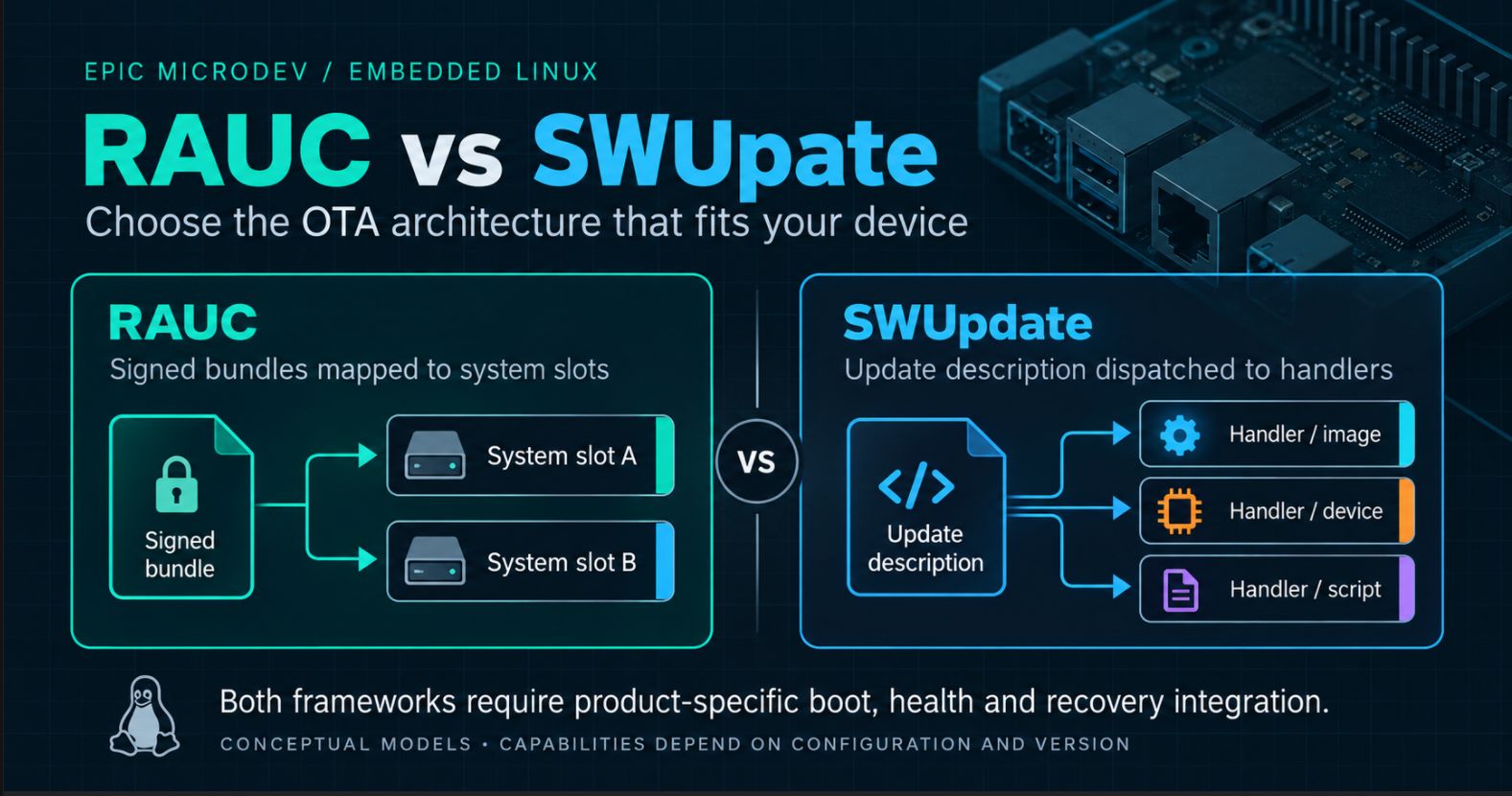
Choose RAUC or SWUpdate by asking which integration model fits the device you must recover after a failed release. RAUC centres its workflow on signed bundles and configured system slots. SWUpdate centres installation on an update description and handlers for individual payloads. Both can underpin production embedded Linux OTA systems; the better fit depends on your bootloader, storage layout and update workflow.
RAUC vs SWUpdate at a glance
Quick verdict: evaluate RAUC first for a well-defined A/B system with a controlled bundle workflow. Evaluate SWUpdate first when payload-specific installation and custom handlers dominate the requirements. These are starting points, not feature boundaries: RAUC is extensible, and SWUpdate can support straightforward A/B updates.
On smaller screens, scroll horizontally to read all three columns.
| Area | RAUC | SWUpdate |
|---|---|---|
| Overall philosophy | Bundles mapped to configured slots and system state. | Update descriptions dispatched to installation handlers. |
| A/B systems | A natural fit for redundant slot groups. | Supported through the selected update and boot strategy. |
| Packaging | Signed bundle containing a manifest and payloads. | SWU archive containing sw-description and payloads. |
| Signing | Bundle signing is mandatory. | Configure signature enforcement and payload hashes. |
| Rollback and recovery | Slot state interfaces with boot selection; health is product-defined. | Installation state interfaces with recovery logic; health is product-defined. |
| Bootloader / U-Boot | Defined boot interfaces; default U-Boot integration uses slot order and remaining attempts. | Boot environment integration and transaction markers; product defines selection and fallback. |
| Yocto / OpenEmbedded | meta-rauc recipes and bundle class. | meta-swupdate recipes and SWU generation classes. |
| Buildroot | Upstream package available. | Upstream package available. |
| Custom logic / handlers | Built-in installation handling, hooks and extensions within its system model. | Broad handler model, including custom C or Lua handlers. |
| Partition flexibility | Represent targets and relationships in the slot configuration. | Describe targets and select suitable handlers; protect the running system explicitly. |
| Production fleet | Integrate distribution, rollout policy and reporting around the updater. | Integrate delivery/backend features with product rollout policy and reporting. |
| Integration complexity | Often simpler when the product fits the slot model. | Flexible workflows create more product-specific paths to validate. |
| Best starting fit | Predictable system images and clearly defined recovery slots. | Payload-specific installation with a justified need for custom workflow. |
What the frameworks do—and what your product owns
The updater accepts an artifact, checks configured requirements and installs its contents. It participates in a larger state machine. Neither installing a package nor receiving an installation-success event proves that the new application is usable.
Your team still owns the partition architecture, boot policy, application health criteria, signing-key lifecycle, backend/device management, fleet rollout rules and support lifetime. Assign those responsibilities before comparing configuration syntax. A flexible updater cannot compensate for a recovery image that cannot contact your service tools.
For the wider architecture, use the OTA planning guide below to define recovery, staged releases and fleet readiness. This comparison focuses on choosing the installation framework once those requirements are explicit.
Architecture: system slots or installation handlers?
RAUC’s target configuration describes slots, their types and relationships. A bundle describes the images to install; RAUC matches them to eligible targets. This encourages treating a release as a known system configuration. Review whether your kernel, rootfs and other boot-critical components can be expressed coherently in that model.
SWUpdate’s sw-description describes artifacts and their installation attributes. Handlers perform the corresponding operations, such as writing an image or processing an archive. Hardware compatibility and software selections can constrain the applicable installation. This is attractive when the product’s essential requirement is controlling several different installation mechanisms.
The practical trade-off is how much behaviour belongs in standard framework configuration and how much becomes your maintained integration code. Prototype the awkward requirement first. A successful rootfs write proves little if the difficult part is recovering a peripheral halfway through its firmware update.
A/B systems: installation is only the first transition
In a typical A/B design, Linux runs from A while the updater writes B. After installation, boot selection temporarily favours B. A bounded number of attempts gives B a chance to prove healthy; failure should return the device to an allowed working system. The exact state transitions must survive resets.
RAUC naturally maps this arrangement to redundant slots. SWUpdate can implement a dual-copy strategy with the appropriate target selection and boot integration. Neither name guarantees isolation: verify that shared boot files, persistent storage and environment writes cannot damage the running or fallback system.
Define health in product terms: essential services started, required hardware accessible and local data usable. Avoid making a temporary cloud outage the sole reason to reject an otherwise healthy image. Conversely, reaching a login prompt is insufficient for a gateway whose fieldbus service never starts.
Packaging and compatibility
A RAUC bundle combines its manifest and payloads with a signature. The manifest identifies compatibility and image classes; the device configuration identifies actual slots. Bundle-format and manifest-feature support must match the installed RAUC version. Keep the oldest supported device client in the release acceptance matrix.
An SWU is a compound archive with sw-description and its referenced payloads; signed workflows also include signature material. The description carries installation metadata, including handler types and configured compatibility requirements. Package creation must agree with the handlers and capabilities compiled into the target updater.
For either framework, a valid artifact for board revision B may be dangerous on revision A. Maintain explicit hardware identifiers and test rejection on incompatible hardware. A release version string is useful traceability, but it is not by itself an enforced upgrade-path policy.
Signed updates, trust and key rotation
RAUC requires signed bundles and uses certificate-based trust through a configured keyring. SWUpdate supports authenticated updates by verifying a signed sw-description whose hashes bind the payloads; production builds must enable and configure signature verification. An unsigned checksum detects accidental corruption, not who authorised an update.
Separate four requirements: TLS protects transport; artifact signatures authenticate the release; encryption protects confidentiality; secure boot checks the configured boot chain. Enabling one does not automatically provide the others. Also specify downgrade policy separately from signature validity: an old vulnerable release can still carry a valid signature.
Design trust rotation before shipping. For example, distribute an authorised trust-store transition while devices still accept the old signer, verify adoption, then move release signing to the new authority. Account for devices offline through that transition and for fallback images carrying older trust. Certificate validity and device time need testing where the selected verification configuration checks them.
Keep release private keys outside device images and normal source control. Exercise rejection of the wrong signer, tampered payloads and incompatible artifacts. Check that rejected or interrupted streaming installations never become boot candidates; verification does not mean no bytes can ever reach an inactive target.
Rollback, recovery and bootloader integration
Separate an installation failure from a failed boot. The former may leave a partial candidate that must remain unselected. The latter requires working boot selection, bounded attempts and a reachable fallback. A recovery environment offers another route, provided it has the drivers, credentials and tools needed to repair the device.
RAUC with U-Boot
RAUC’s default U-Boot interface uses BOOT_ORDER and BOOT_<bootname>_LEFT, such as BOOT_A_LEFT. The boot logic must interpret slot order and decrement remaining attempts. Product health logic can confirm a successful boot using rauc status mark-good. Adapt the boot script and userspace environment access to the actual board.
U-Boot also documents a RAUC boot method for a symmetric A/B layout with separate boot and rootfs partitions. Check availability and layout assumptions in your chosen U-Boot release rather than assuming every BSP contains it.
SWUpdate with U-Boot
SWUpdate can access the U-Boot environment through its bootloader integration. Its documented transaction marker, recovery_status, is set to in_progress before installation, then cleared on success or set to failed on failure, when marker handling is enabled. This reports installation state; it is not RAUC’s slot-attempt protocol or proof of application health.
Implement slot selection, boot attempts and post-boot confirmation in the product’s chosen boot strategy. For both frameworks, verify environment storage offsets and reset behaviour. Test power interruption during state changes as well as image writes: intact rootfs partitions are insufficient if the bootloader cannot select them.
Yocto and OpenEmbedded integration
Both projects provide dedicated layers. meta-rauc supplies RAUC integration and a bundle class for recipes that assemble update artifacts. The product layer provides the target configuration and trust material. Choose a layer branch compatible with the Yocto release and BSP you actually maintain.
meta-swupdate supplies the updater and classes for producing SWU artifacts from build outputs. Its swupdate class supports package recipes; swupdate-image supports a simpler image-recipe workflow. The project also documents a rescue-image recipe. You still supply the description, payload selection and signing configuration.
Neither wins merely because the team uses Yocto. Compare the release pipeline end to end: reproducible payloads, controlled signing, retained artifacts and installation on supported old images. Keep development keys out of production builds and make deployment approval a separate operation from artifact generation.
Buildroot integration
Current upstream Buildroot contains packages for both RAUC and SWUpdate. RAUC’s documentation identifies BR2_PACKAGE_RAUC; SWUpdate’s package uses BR2_PACKAGE_SWUPDATE and exposes configuration for the updater build. Therefore, choosing Buildroot does not exclude either framework.
Package availability is a starting point. Your Buildroot release determines available versions and options. Define how your external tree or image-generation pipeline installs configuration, trust stores and boot tools, then constructs and signs release artifacts. Do not assume a target package alone produces a deployable OTA release.
Evaluate the same board and failure requirements as with Yocto. Budget maintenance for build configuration and artifact generation, especially if a vendor BSP pins an older updater. Test a generated release on the oldest supported target instead of validating only a freshly built development image.
Custom logic and updates beyond the root filesystem
SWUpdate’s handler model is a strong reason to evaluate it when installation varies by payload. Built-in handlers cover different storage and processing operations; custom C or Lua handlers can extend that model. Confirm that the selected handler supports the actual peripheral protocol, error reporting and interruption behaviour before counting it as a solved requirement.
RAUC also has installation handlers and hooks; it is not limited to copying one rootfs image. Current documentation additionally describes artifact repositories for content outside conventional system slots. Check version support and whether the extension preserves the lifecycle you need. The distinction is the primary integration model, not whether customisation is possible.
Consider a hypothetical device with a bootloader, kernel, device tree, Linux rootfs, FPGA image, MCU firmware and persistent configuration. Write a compatibility contract for every boundary. Can the old Linux image operate with the new MCU firmware? Can an old device tree describe the new FPGA design? Which component can restore the others?
A package containing every component is not automatically an atomic transaction across them. Bootloader replacement may depend on boot-ROM recovery or storage-specific redundancy. A single-bank MCU can have a different recovery limit from dual rootfs slots. Identify irreversible steps and validate the sequence on hardware.
Prefer supported handlers with explicit inputs and outcomes. Keep necessary hooks small, bounded and safe to retry. A post-install script that edits shared configuration or flashes another processor has created another failure boundary; document its partial states and recovery instead of hiding complexity inside a successful exit code.
Persistent data can defeat an otherwise working rollback
Returning to the old rootfs does not undo a shared database migration. If the new application rewrites records into a format the old application cannot read, boot fallback can succeed while the product remains broken. Neither framework can infer your data compatibility rules.
Define the supported application/data combinations and when migration becomes committed. Depending on the product, use compatible additive changes, versioned configuration, recoverable copies or staged migrations. Each approach needs storage and interruption testing. Retain identity, calibration and customer configuration deliberately; do not treat every persistent partition as replaceable payload.
This requirement can outweigh the RAUC-versus-SWUpdate choice. Include migration completion in health criteria where appropriate, and test the old application against the data left by a failed candidate. A backup is useful only if the recovery environment can locate, validate and restore it within the support constraints.
Failure scenarios to test before choosing
On smaller screens, scroll horizontally to read all three columns.
| Failure | RAUC evaluation | SWUpdate evaluation |
|---|---|---|
| Power loss during update | Interrupt slot writes and boot-state changes; prove an incomplete candidate stays unselected. | Interrupt each handler and state change; prove partial payloads cannot trigger unsafe activation. |
| Image boots; application fails | Withhold mark-good and demonstrate the configured boot fallback. | Withhold product confirmation and demonstrate the chosen boot-attempt/fallback logic. |
| Wrong key or expired trust | Exercise keyring rejection and applicable certificate/time policy; retain a trusted recovery route. | Exercise enforced signature rejection and the chosen trust/time policy; retain a trusted recovery route. |
| Insufficient storage | Check target sizes and staging needs before destructive work. | Check every handler’s target, temporary space and decompression requirements. |
| Network disconnect | Test the selected download or streaming path; establish safe retry and candidate state. | Test the selected delivery and installation path; establish retry behaviour for partial operations. |
| Device misses several releases | Check old client format support, trust transitions and data compatibility. | Check old parser/handler support, trust transitions and migration sequencing. |
These are acceptance tests to design, not guarantees supplied by the table. Record the running version, attempted version and reason for rejection or fallback. Repeat the tests at the actual storage boundaries and with the hardware watchdog enabled. Keep recovery instructions usable by the people who will support deployed units.
Four example product decisions
The following scenarios are hypothetical evaluation starting points, not claims about completed customer projects.
Industrial gateway with dual rootfs slots
Evaluate RAUC first when a gateway already has a stable A/B partition map and delivers kernel/rootfs releases together. The slot model fits the architecture. Validate boot attempts, peripheral startup and fallback data compatibility. SWUpdate remains viable if the team already maintains a proven integration.
Connected appliance with Linux and MCU firmware
Evaluate SWUpdate first if a suitable existing or maintainable custom handler can implement the MCU’s real update protocol. Validate recovery after either processor updates first, including power loss mid-transfer. Also assess RAUC if system slots plus a bounded extension express the lifecycle more clearly.
Constrained device with a custom layout
Evaluate both after determining what remains bootable during a write. SWUpdate’s handler flexibility may fit unusual targets; a RAUC recovery layout may also fit. Limited flash does not make single-copy updates recoverable. Prototype storage requirements, rescue boot and local repair before choosing on package size.
Fleet with complex data migrations
Evaluate both against supported upgrade paths. A fleet that skips releases needs explicit trust and schema transitions, regardless of updater. Start with devices several releases behind and exercise forward update, rejection and fallback. Prefer the integration your team can maintain and diagnose throughout the support lifetime.
Which should you choose?
On smaller screens, scroll horizontally to read all three columns.
| Evaluate first | When it fits | Evidence needed before committing |
|---|---|---|
| RAUC | Defined redundant slots, system-image releases and a controlled signed-bundle workflow. | Correct slot mapping, boot confirmation, fallback and compatibility across supported versions. |
| SWUpdate | Payload-specific installation and custom handlers are central requirements. | Handler coverage, interruption behaviour and maintainable boot/recovery integration. |
| Both | Boot architecture is unsettled, payloads are heterogeneous or rollback involves complex migrations. | A shared failure-test matrix and a realistic estimate of product-specific code and support effort. |
Before selecting either framework, write down the following. If a requirement is unresolved, treat that as an architecture task rather than an updater feature request.
Choose the framework that expresses those requirements with understandable configuration and the least fragile product-specific code. A convincing decision includes a failed update that recovers correctly, not just a successful installation demonstration.
References and engineering support
Official documentation and upstream build integrations were reviewed on 11 October 2026. Links beside each technical section identify the relevant sources. The linked latest/master documentation can change; pin implementation decisions to the framework, bootloader and build-system releases shipped in your product.
Designing an embedded Linux product with remote update requirements? Epic Micro Dev can help review OTA architecture, bootloader integration, firmware, Linux platform engineering and production readiness.